Senin, 02 September 2013

Pac-Man - level 256

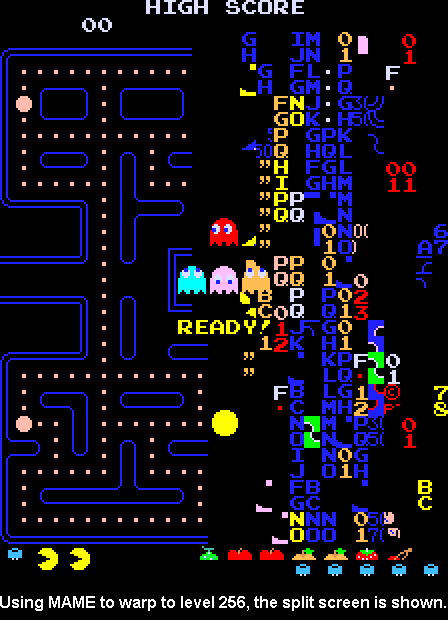
Ever wondered about the infamous level 256 of Pac-Man? Don Hodges has an in-depth explanation of the phenomenon, together with code examples and a patch for fixing it. Read on.


Minggu, 01 September 2013

How to Splitscreen Co-op Minecraft JoyPad Mod

Minecraft forum user stcrowe created a video on youtube covering basics of installing Forge and Joypad Mod, as well as some nice tricks like how to play local game with multiple players on the single account.

Senin, 15 Juli 2013

Bugfix for the camera without window focus

Bugfix for the camera without window focus

I've released a small update for the Minecraft joypad mod which fixes an annoying bug with camera in windows without focus. Sorry for that one!


My thanks go to numerous people who notified me about the problem here in comments and through Minecraft forums. Thanks!

Selasa, 11 Juni 2013

Up to 1.6 - Minecraft Joypad Mod v0.14

I've updated the Joypad Mod to version 1.6.1 of Minecraft. It's compatible with the new launcher, and contains all of the old features of previous versions + the workaround for the "auto-strafe upon entering the world" issue. It's still not Forge-friendly, but it'll get there eventually ;).


Enjoy this version, and report bugs, so I can fix them for 1.6.2 ;)


Rabu, 03 April 2013

How to set up a perfect split screen for Minecraft on your PC

Today I wondered how to properly split the screen when playing Minecraft in split screen with the Joypad / Split Scren Mod. Before I got a second monitor I just used the Windows 7 snap docking functionality to split the screen evenly between two Minecraft windows, and nowadays I just run each window on a separate display. But this works only for the two players, and is kinda ugly since window borders are still being displayed:


Today I found a better solution - programs named WinSplit Revolution and WinExplorer.


WinExplorer allows us to remove window borders while WinSplit Revolution arranges windows evenly to our liking with a keyboard shortcut.

Here's a short tutorial on how to split screen semi-evenly for 3 players (can be expanded up to 9 players, I think) on a single monitor. You'll need the both programs and the Joypad mod, of course :). Also, I used a separate Minecraft.net account for each player, but I think it's somehow possible to use just one.


  • 1. Download and install/unzip WinExp and WinSplit Revolution (they're both freeware)
  • 2. Run multiple copies of Minecraft (all except one must be running the Joypad Mod)
  • 3. Run WinExplorer, click on the button "Refresh", go to the tab named "Style", and then click on each Minecraft window on the list and untick checkboxes "WS_DLGFRAME" and "WS_BORDER"

  • 4. Minimize or close WinExplorer
  • 5. Hide the taskbar
  • 6. Alt+Tab into each Minecraft window and press the WinSplit keyboard shortcut to place the window where it seems appropriate. You can choose from at least 9 different placements with the shortcut Ctrl + Alt + [Num1 - Num9]. Try out different layout until you find the one that fits you, for example:


That's it! When you place the windows you can start playing. Open the world to LAN in one game and join from others.

TIP: To switch between Minecraft windows you can use Alt+Tab OR press 'E' (inventory key) - it will display the inventory screen which will also cause the  Minecraft to release your mouse cursor, so you can navigate to the other window. You can close the inventory afterwards with the controller.


Chillin' around, 3p style!

Interesting piece of trivia - you can configure multiple copies of the game to use the same gamepad and thus controll all of them simultaneously. You can make an interesting challenge out of it - controlling multiple players on the same server at the same time, or playing multiple single player games at the same time :)

Selasa, 05 Maret 2013

Converting PSP save file to Xperia Play

I've created a very simple tool for converting PSX memory card images from PSP to Xperia Play. If you have been playing PSX games on your PSP and want to continue on Xperia Play you're welcome to use it :)

That is NOT the actual screenshot of the tool. It's the hex editor showing the PSP save file.

Long story short, I wanted to carry over some saves from PSP to Xperia Play. Both devices use some kind of PSX memory card image files, so I hoped simply copying them over would work. Unfortunately that is not the case. A quick glance at the hex editor revealed that the files are actually similar, but the PSP one contains 128 byte long header. Simply stripping it with dd resulted in a working Xperia Play save, so I have thrown together a quick batch file to ease up the process. You can get it here:

Download psp2xperia

 Password

getitnow

It's very simple really. Just drag and drop your PSP save file over the psp2xperia.bat and you'll get the Xperia Play save. Copy it to your phone and try running the game.

In the package you'll also find the batch file for adding the header back, so you can in theory make the PSP save from the Xperia Play one, but I'm not sure if the header is supposed to be always the same, and haven't really tested it. Let me know if it works.

Cheers!

And yes, I will be releasing the Joypad Mod for Minecraft 1.5.x, somewhere in the future ;). Thanks for the support!

Rabu, 09 Januari 2013

Introducing 1.4.6

Introducing 1.4.6
Hi all,

I have updated my Joypad/Split Screen mod to the newest version of the Minecraft (1.4.6).


Changelog for version 0.12.0:

  • ported all bugs and features to Minecraft 1.4.6

There are no new features (that I know of), but I plan to fix some long standing issues in the future, as well as investigate some possible developments. For now, enjoy the new old Joypad Mod.

Get it here.