Kamis, 05 September 2013

New JoypadMod Version 0.1


Thanks to hard work of ahickey and our contributors, the new version of the joypad mod for Minecraft is out, and it is ambiguously versioned as 0.1, because frankly - why not :)

New JoypadMod Version 0.1


It is not to be confused with the original Forge-less joypad mod v0.1 - which was never released ;-)

This new version contains the following improments over the previous release:


  • Updated precision handling of the cursor and in game camera
  • Can now have Joypad enabled and override temporarily with mouse properly in scrolls/buttons/slots
  • Updated control menu to resemble the Minecraft key/mouse menu
  • Set any available keybinding from within the control options menu
  • Add share settings to advanced menu (allows sharing the joypad settings with any other users)
  • Flans mod vehicle driving works ( camera viewing needs some work though )
  • Multilanguage enabled (most major key selections)
  • Full joypad menu localization for Magyar (Hungarian), Polski (Polish), Српски (Serbian), Русский (Russian), Deutsch (German), 日本語 (Japanese), 简体中文 (Chinese Simplified), 繁體中文 (Chinese Traditional)

Special thanks to Shiny, Sonja, Kaoru, Tatiana & Google for helping with translations (some translations may be completely wrong so let us know!)


If you want to see your language fully translated for this mod then let us know and we can add it!

As usual, versions for both 1.6.4-Forge and 1.7.2-Forge are available for download at the joypad mod page Password getitnow .

Senin, 02 September 2013

Joypad/Split Screen mod for Forge - v0.0952

It's time for new round of improvements for Joypad Mod for Forge. New version 0.0952 contains a lot of improvements that should make using controller much more enjoyable. Here's the full changelog:

  • Map any key to a joypad button - great for mods!
  • Axis calibration menu - no more spinning in circles!
  • New and improved controller button options menu
  • Container scrolling up/down via buttons
  • Improved sensitivity options in menu
  • Allow choosing of any connected controller even if it doesn't meet input requirements
  • All joypad input will go through the keyboard / mouse buffer for full compatibility with mods
  • Lots of minor tweaks for a better in game experience
  • .minecraft\config\JoypadSplitscreenMod.cfg updates:
  • Make logging verbosity an option
  • Share joypad settings across all users (thanks stcrowe!)
As always, you can get the newest version from the mod page.

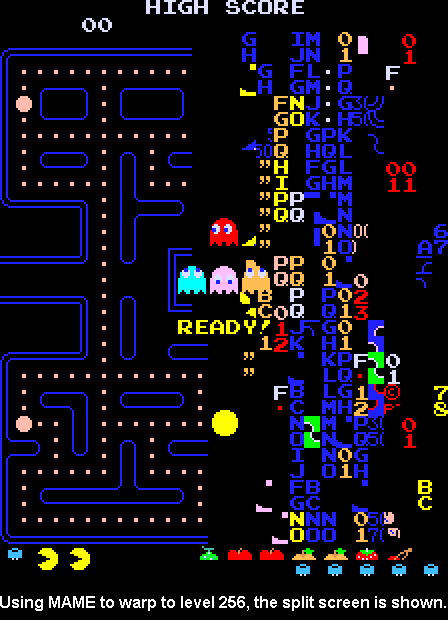
Pac-Man - level 256

Ever wondered about the infamous level 256 of Pac-Man? Don Hodges has an in-depth explanation of the phenomenon, together with code examples and a patch for fixing it. Read on.


Minggu, 01 September 2013

How to Splitscreen Co-op Minecraft JoyPad Mod

Minecraft forum user stcrowe created a video on youtube covering basics of installing Forge and Joypad Mod, as well as some nice tricks like how to play local game with multiple players on the single account.

Senin, 15 Juli 2013

Bugfix for the camera without window focus

Bugfix for the camera without window focus

I've released a small update for the Minecraft joypad mod which fixes an annoying bug with camera in windows without focus. Sorry for that one!


My thanks go to numerous people who notified me about the problem here in comments and through Minecraft forums. Thanks!

Selasa, 11 Juni 2013

Up to 1.6 - Minecraft Joypad Mod v0.14

I've updated the Joypad Mod to version 1.6.1 of Minecraft. It's compatible with the new launcher, and contains all of the old features of previous versions + the workaround for the "auto-strafe upon entering the world" issue. It's still not Forge-friendly, but it'll get there eventually ;).


Enjoy this version, and report bugs, so I can fix them for 1.6.2 ;)


Rabu, 03 April 2013

How to set up a perfect split screen for Minecraft on your PC

Today I wondered how to properly split the screen when playing Minecraft in split screen with the Joypad / Split Scren Mod. Before I got a second monitor I just used the Windows 7 snap docking functionality to split the screen evenly between two Minecraft windows, and nowadays I just run each window on a separate display. But this works only for the two players, and is kinda ugly since window borders are still being displayed:


Today I found a better solution - programs named WinSplit Revolution and WinExplorer.


WinExplorer allows us to remove window borders while WinSplit Revolution arranges windows evenly to our liking with a keyboard shortcut.

Here's a short tutorial on how to split screen semi-evenly for 3 players (can be expanded up to 9 players, I think) on a single monitor. You'll need the both programs and the Joypad mod, of course :). Also, I used a separate Minecraft.net account for each player, but I think it's somehow possible to use just one.


  • 1. Download and install/unzip WinExp and WinSplit Revolution (they're both freeware)
  • 2. Run multiple copies of Minecraft (all except one must be running the Joypad Mod)
  • 3. Run WinExplorer, click on the button "Refresh", go to the tab named "Style", and then click on each Minecraft window on the list and untick checkboxes "WS_DLGFRAME" and "WS_BORDER"

  • 4. Minimize or close WinExplorer
  • 5. Hide the taskbar
  • 6. Alt+Tab into each Minecraft window and press the WinSplit keyboard shortcut to place the window where it seems appropriate. You can choose from at least 9 different placements with the shortcut Ctrl + Alt + [Num1 - Num9]. Try out different layout until you find the one that fits you, for example:


That's it! When you place the windows you can start playing. Open the world to LAN in one game and join from others.

TIP: To switch between Minecraft windows you can use Alt+Tab OR press 'E' (inventory key) - it will display the inventory screen which will also cause the  Minecraft to release your mouse cursor, so you can navigate to the other window. You can close the inventory afterwards with the controller.


Chillin' around, 3p style!

Interesting piece of trivia - you can configure multiple copies of the game to use the same gamepad and thus controll all of them simultaneously. You can make an interesting challenge out of it - controlling multiple players on the same server at the same time, or playing multiple single player games at the same time :)